
Ditch Coding: Top Low-Code/No-Code Platforms

The rise of low-code/no-code (LC/NC) platforms has democratised software development, empowering “citizen developers” to build applications and automate processes. These tools significantly accelerate development cycles, reduce reliance on specialist programmers, and enable businesses to rapidly adapt to changing needs. This blog post explores some of the leading LC/NC platforms, examining their strengths and weaknesses to help you choose the right tool for your needs.
Appian: Power and Enterprise-Grade Capabilities
Appian is a robust LC/NC platform specifically designed for building complex, enterprise-grade applications. It excels in business process management (BPM), case management, and dynamic case management, providing powerful features for workflow automation, data management, and a highly customisable user interface. Appian’s strength lies in its ability to handle demanding enterprise requirements, seamlessly integrate with existing systems, and scale to support large user bases and complex data structures. It also offers strong security features and compliance certifications.
However, Appian’s enterprise focus comes with a higher price tag compared to some other LC/NC platforms. Its complexity can also present a steeper learning curve for citizen developers with minimal coding experience. While it offers visual development tools, a basic understanding of data structures, logic, and API integrations is beneficial for maximising its capabilities. Appian is best suited for large organisations with complex application needs and dedicated IT support.
Mendix: Bridging the Gap Between Business and IT
Mendix is another robust LC/NC platform that caters to both citizen developers and professional coders, aiming to bridge the gap between business requirements and IT implementation. It provides a visual development environment for building web and mobile applications, with a strong emphasis on collaboration between business and IT teams. Mendix offers a good balance of ease of use for basic app creation and powerful features for more complex scenarios, allowing for seamless handoff between citizen developers and professional developers when needed.
While Mendix is designed to be user-friendly with its drag-and-drop interface and visual workflows, its comprehensive feature set, including its microflow logic and data modelling tools, can be overwhelming for beginners. The platform’s pricing model, based on application usage and user count, can also be a consideration for smaller businesses or individual developers. Mendix is a good fit for organisations that want to empower citizen developers but also need the flexibility to involve professional developers in more complex projects.
Power Apps: Microsoft’s Ecosystem Advantage
Power Apps, part of the Microsoft Power Platform, seamlessly integrates with other Microsoft products and services, making it a natural choice for businesses heavily invested in the Microsoft ecosystem. It allows users to build custom business apps with relative ease, leveraging pre-built templates, connectors to various data sources (including Microsoft Dataverse, SharePoint, and SQL Server), and a familiar Excel-like expression language. This tight integration simplifies data access and workflow automation within the Microsoft environment.
A key advantage of Power Apps is its smooth integration with other Microsoft tools like Excel, SharePoint, and Teams, streamlining workflows and data sharing. However, this tight integration can also be a disadvantage for businesses that rely heavily on other platforms or prefer a more open ecosystem. The platform’s cost, based on per-user or per-app plans, can increase as usage scales and more advanced features are required. Power Apps is ideal for organisations already heavily invested in the Microsoft ecosystem and looking to build apps that integrate seamlessly with their existing systems.
Zoho Creator: Versatility and Affordability
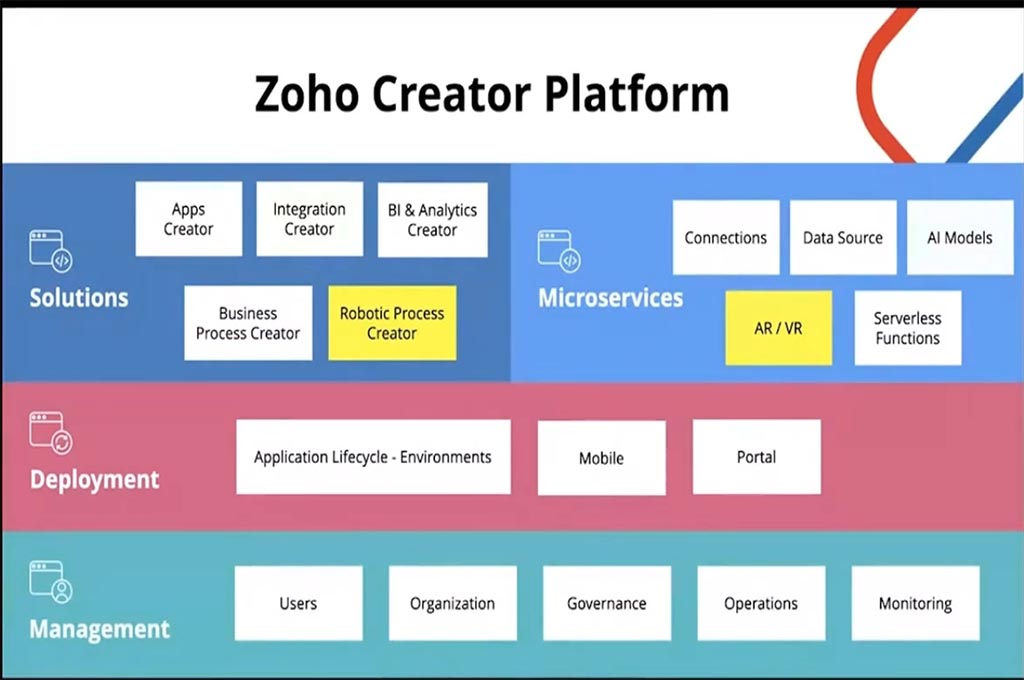
Zoho Creator is a versatile LC/NC platform that offers a wide range of features for building web and mobile applications. It’s known for its user-friendly interface, drag-and-drop visual development tools, and relatively affordable pricing, making it a good option for small and medium-sized businesses. Zoho Creator offers a range of pre-built templates and connectors to popular services, simplifying integration with existing systems. It also provides good customisation options for UI design and workflow automation.
Zoho Creator’s strength lies in its balance of features and affordability, making it accessible to a wider range of businesses and individuals. However, for very complex, enterprise-grade applications requiring highly specialised functionalities or integrations, it might lack the robustness and scalability of platforms like Appian or Mendix. Zoho Creator is a strong choice for SMBs looking for a cost-effective and user-friendly platform to build custom business applications.
Webflow: Empowering Web Designers
Webflow is a no-code platform specifically designed for building and hosting responsive websites. It provides a visual interface for designing and developing websites without writing any code, empowering designers to bring their visions to life with full control over design elements. Webflow generates clean, production-ready code in the background, giving designers more flexibility than traditional website builders. It also offers hosting and Content Management System (CMS) capabilities. Explore Webflow: https://webflow.com/
Webflow excels in website design and development, offering granular control over design elements, animations, and interactions. However, it’s primarily focused on website creation and may not be suitable for building complex business applications with intricate logic or data processing requirements. Webflow is the ideal choice for designers and businesses that prioritise visual design and want to build and manage websites without needing coding expertise.
Airtable: The Collaborative Database
Airtable combines the ease of a spreadsheet with the power of a database. It provides a flexible platform for organising and managing data, and it can be used to build simple applications and workflows. Airtable’s user-friendly interface allows users to easily create and manage tables, link records, and collaborate on data. It also offers integrations with other popular tools. Discover Airtable:
Airtable’s strength lies in its intuitive interface, collaborative features, and flexibility in organising various types of data. However, its capabilities for building complex applications with sophisticated logic, integrations, or user interfaces are limited compared to dedicated LC/NC platforms. Airtable is a great option for teams that need a powerful and collaborative way to manage data and build simple workflows, but it might not be sufficient for complex app development.
Conclusion
The LC/NC landscape is constantly evolving, with new tools and features emerging regularly. The best LC/NC platform for your business will depend on your specific needs, technical expertise, budget, and the complexity of the applications you need to build.
By carefully evaluating the pros and cons of each platform, considering factors like scalability, security, integration capabilities, and vendor support, you can choose the right tool to empower your citizen developers and accelerate your digital transformation. Don’t hesitate to try out free trials or demos of different platforms to get a feel for their interfaces and capabilities before making a final decision.